


On this page, you will find all important information, instructions, and guidance related to our older and discontinued hörbert models. If you own an earlier hörbert, you can conveniently find the appropriate documentation, usage tips, as well as information on maintenance and possible spare parts here. We want to ensure that your hörbert – regardless of its year of manufacture – continues to accompany you reliably.
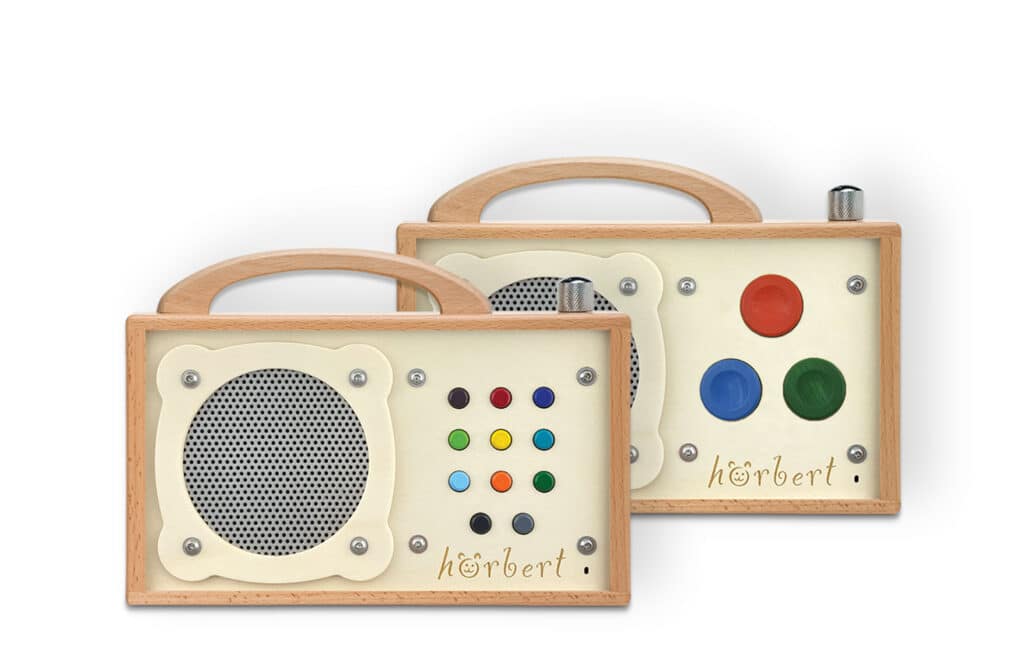
The hörbert 2021 is the model we manufactured and sold from October 2021 to March 2026. It can be identified by the fact that it has neither a mechanical toggle switch nor an LED indicator (only present on the latest hörbert 3.0) between the handle and the volume control. The device is available in a version with 11 buttons or 3 buttons.
People who use hörbert, especially young children who often playfully press all the buttons, mustn’t accidentally enter hörbert’s SET mode. That’s why we’ve devised a method that can’t be applied “by accident”.
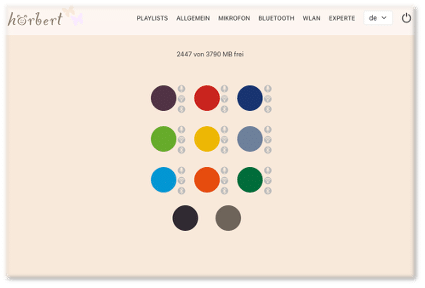
In Browser Set Mode, you can now make all settings for hörbert. For example:
Enable/disable Wi-Fi, Bluetooth and the voice microphone, edit playlists, add podcasts or web radio stations, and much more.
Here you’ll find an overview of the possibilities in Browser Set Mode: BLOG ARTICLE BROWSER SET MODE
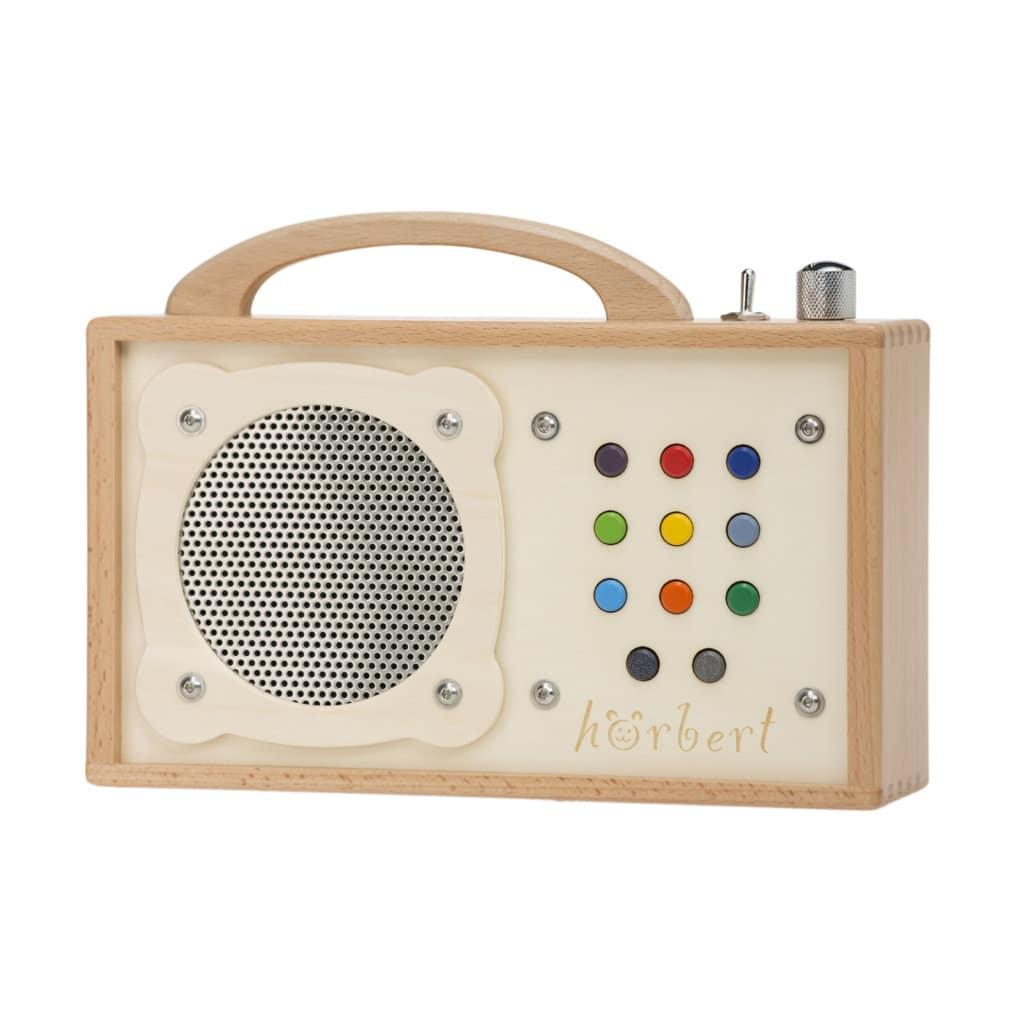
The hörbert 2011 is our model that we manufactured and sold from 2011 until October 2021. Thanks to its extremely minimalist electronics, this model offers an especially long playback time. You can recognize the hörbert 2011 by its mechanical toggle switch, which is located between the handle and the volume control knob.
Links for downloading the software that allows you to create your own playlists and transfer them onto memory cards that can be played by the hörbert 2011.
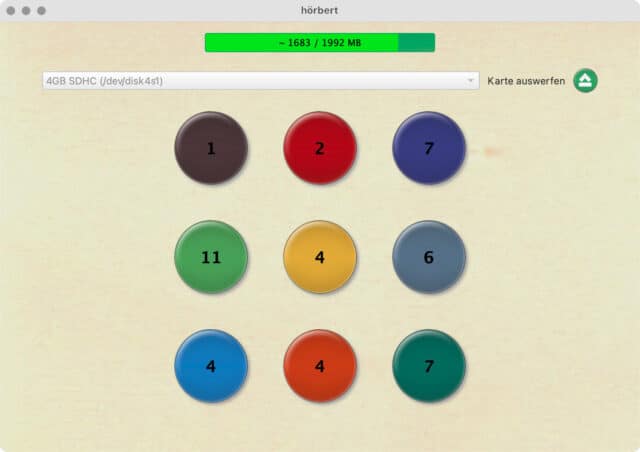
If you experience installation issues, please install Adobe AIR first:
Download from the ADOBE website
Download from the CHIP.DE website

You are currently viewing a placeholder content from YouTube. To access the actual content, click the button below. Please note that doing so will share data with third-party providers.
More InformationYou are currently viewing a placeholder content from YouTube. To access the actual content, click the button below. Please note that doing so will share data with third-party providers.
More InformationYou are currently viewing a placeholder content from YouTube. To access the actual content, click the button below. Please note that doing so will share data with third-party providers.
More InformationYou are currently viewing a placeholder content from YouTube. To access the actual content, click the button below. Please note that doing so will share data with third-party providers.
More Information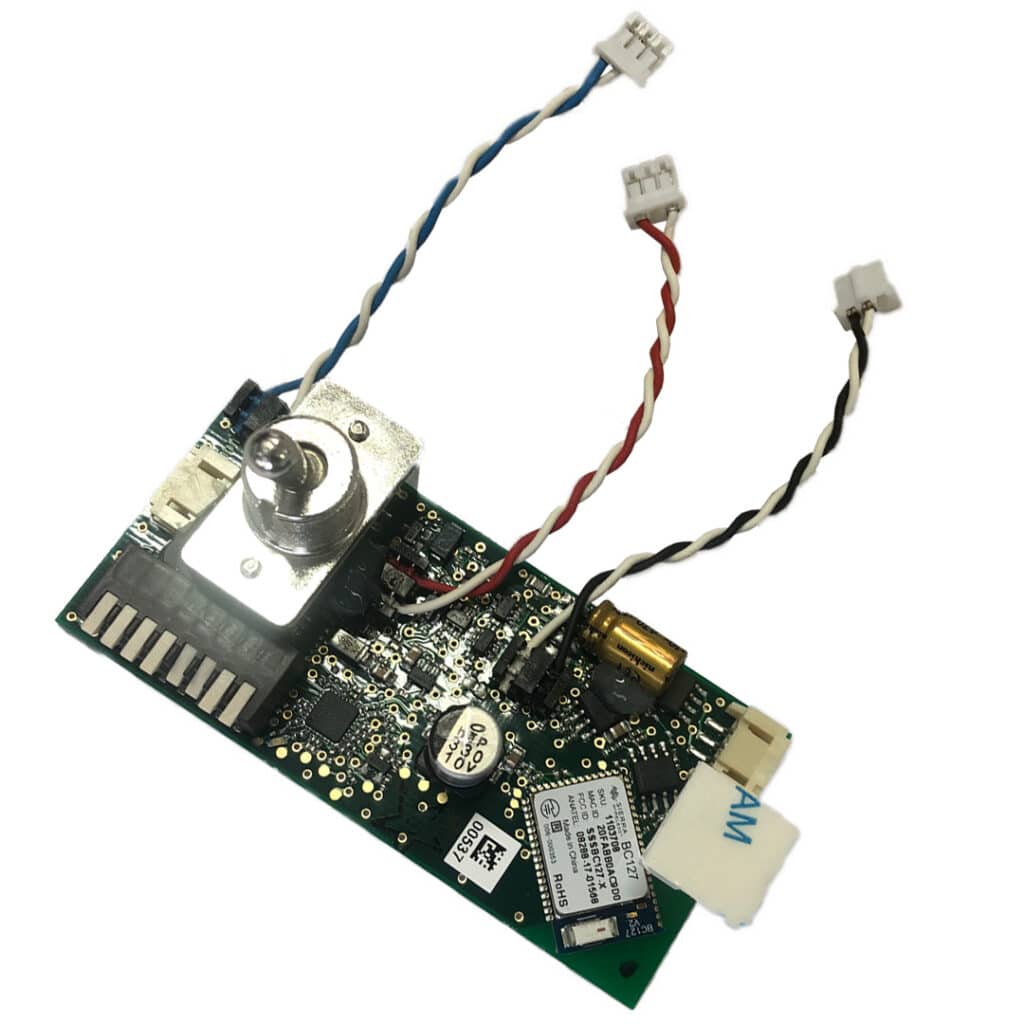
You are currently viewing a placeholder content from YouTube. To access the actual content, click the button below. Please note that doing so will share data with third-party providers.
More InformationYou are currently viewing a placeholder content from YouTube. To access the actual content, click the button below. Please note that doing so will share data with third-party providers.
More InformationYou are currently viewing a placeholder content from YouTube. To access the actual content, click the button below. Please note that doing so will share data with third-party providers.
More InformationYou are currently viewing a placeholder content from YouTube. To access the actual content, click the button below. Please note that doing so will share data with third-party providers.
More InformationYou are currently viewing a placeholder content from YouTube. To access the actual content, click the button below. Please note that doing so will share data with third-party providers.
More InformationPlease try the following after starting the hörbert software and inserting the SD card.
Go to the top menu in the software and select Tools -> Select target manually.
The card should then be selectable there.
If this is not possible, our development team has prepared a solution:
With manual selection, you can simply choose a folder on your hard drive – instead of the memory card. The hörbert software will then treat this folder as if it *were* a memory card.
If your memory card can be used with the card reader under your operating system and is correctly mounted, you can then simply copy the contents of this folder onto the memory card. This feature is intended for cases where the mount directory of the memory card does not work for any reason, and when alternatives such as “Sox” also fail.
The new hörbert 2021 has been continuously tested in our workshop at medium volume using high-quality AA batteries.
In standard mode – meaning playback from its SD card – hörbert runs for approximately 38 hours.
The older standard model of hörbert 2011 – without additional modules such as a sleep timer or Bluetooth module – was the top performer in the Stiftung Warentest test in November 2019.
In their test, it achieved 56 hours of playback time, while in our in-house tests it reached approximately 50 hours.
With a built-in sleep timer module (automatic shut-off), the playback time is reduced by a few hours.
With a built-in Bluetooth module, the playback time is reduced by up to one third of the standard model’s duration, resulting in around 35 hours.
Would you like all the new features such as Bluetooth, internet radio, voice recordings, sleep timer, and pause function
for your own hörbert as well? No problem! Starting from spring 2023, we are once again offering upgrades carried out by us.
However, hörbert 2011 must be sent to us for the upgrade.
Please contact us via the contact form so that we can provide you with an upgrade offer.
Visual differences:
The new hörbert comes with a slightly updated appearance and completely new internal electronics.
New features:
Proven and still included:
Due to the very high power consumption of these cards, interference noises may occur in the Bluetooth module during standard playback mode.
This does not happen with the cards we supply. We therefore recommend using the original hörbert memory card, as your hörbert will also run longer with it.
A Transcend card tested by us (16 GB Class 10) had significantly higher power consumption than our original cards.
This is, of course, detrimental to battery life.
If you do not want to give up your memory card, please contact our support team (service@winzki.de), as we can upgrade your hörbert circuit board for a small service fee so that even power-hungry memory cards can be used with minimal interference.
In general, the following applies: unfortunately, we cannot guarantee the functionality of third-party cards, as manufacturing methods and internal components can vary greatly and change frequently. We source our own memory cards directly from the manufacturer according to our specifications.
It is possible to change the name of paired devices in your Bluetooth transmitter.
You can find the necessary tips under the links below, depending on which device you are using:
www.support.apple.com (rename a Bluetooth device):
https://link.hoerbert.com/6M00K
www.Techify.de (rename paired Bluetooth devices on Android):
https://link.hoerbert.com/5pUwQ
www.genuine-lamps.com (how to rename Bluetooth devices on Windows):
https://link.hoerbert.com/4i3QG
The strength of electromagnetic radiation depends on the transmission power of the devices.
The performance class of the hörbert Bluetooth module corresponds to Class 2. This means: our Bluetooth connections are all Class 2 with a transmission power of up to 2.5 mW (+4 dBm).
Due to its very low transmission power, the hörbert Bluetooth module definitely complies with the recommended SAR limits.
This depends on the environment, for example whether there are obstacles such as walls or barriers in the way. However, the range is typically around 15 meters.
In hörbert mode, you simply listen to content with your hörbert as usual. Just switch it on, and it starts playing. Your hörbert with a built-in Bluetooth module will consume slightly more power in this mode than the standard hörbert, and therefore it will not reach the 50-hour runtime. This is because the audio has to pass through the Bluetooth module, which also requires some power. The playback time is therefore approximately one third shorter.
This faint humming, which is usually only noticeable during quiet moments and only in piano mode, is due to the fact that the audio has to pass through the Bluetooth module.
Interference noise can be minimized if all cables leading to the Bluetooth module are twisted together first, as shown in the installation video and in the installation instructions.
Note: Interference noise may be stronger if memory cards other than our original ones are used, as some cards draw more power than others.
hörbert arrives ready to play.
Depending on your selection, it comes with a preloaded memory card containing either German, international, or Swiss German audio content for children. If you choose a barrier-free hörbert, you can also select an empty SD card or one with audio content for adults. The hörbert for seniors automatically includes the free adult content card.
This means you receive over two hours of selected songs and stories right away.
We also include 4 AA batteries so you can start using hörbert immediately after unpacking it.
You can also use 4 rechargeable AA batteries in hörbert’s battery holders.
Important note:
If you purchase a hörbert with optional USB port and battery charging function, it is also delivered with a preloaded complimentary memory card of your choice.
However, to operate it via a power outlet, you will still need the following accessories:
If you would like to use hörbert on the go, you will additionally need:
You can find everything about hörbert’s USB port HERE.
We arrange this with you on a case-by-case basis: after all, it depends on what is broken, and we determine that, for example, via email, by phone, or at the latest in our workshop. Some repairs can be carried out by you if you wish, while others we prefer to handle here in our workshop.
We always work with you to find the most cost-effective way to get your hörbert ready to play again.
If you live in Switzerland, Liechtenstein, or the UK and need to send your hörbert from there, please contact us beforehand and do not send it without a return label from us, otherwise it may get held up at customs.
If hörbert needs to be sent to us for repair, we will of course try to preserve everything as much as possible.
As long as the decorated part is not damaged, we will only repair the rest, and you will receive your own hörbert back.
Please note that hörbert’s frame and front panel form a single unit. Individual parts cannot be replaced separately, as this would not be good for stability.
You can replace the handle, the speaker, the on/off switch, and the volume control (on the hörbert 2011), and in exceptional cases—after consulting with us—even the circuit board yourself, provided you have sufficient technical know-how and the necessary tools at home. If this is not the case, please contact us so that we can assist you.
A housing replacement (i.e. replacing the frame and the front while reusing all intact hörbert components) is generally carried out only in our workshop, as we may also perform necessary minor repairs and replace small parts—of course at a previously agreed flat rate, with the occasional screw included free of charge.
If batteries leak, you will find traces of battery chemicals on the electronics (circuit board). These traces must be completely removed to get your hörbert working again.
Important safety instructions:
Pay attention to your safety and that of your surroundings during the following steps! Only work with safety goggles! Only work with protective gloves! Do not touch anything else with the gloves! Work with an open window and sufficient fresh air! Do not work near flames or ignition sources! Keep chemicals and tools away from children! These instructions do not apply to other devices! Leave the repair to us if you do not feel confident performing any step! Risk of injury: Splashes of alcohol or battery chemicals in the eyes can cause serious eye injuries. In case of an accident, consult a doctor immediately. Working with high-proof alcohol can cause fires. Keep extinguishing agents ready. Alcohol can dry out your skin, so wear gloves! And again: keep children away from chemicals and tools!
There are two possible causes: either the contents of the memory card have become disorganized and hörbert can no longer read the card, or residues from leaking batteries are affecting the electronics. (In that case, continue with: Problems with leaking batteries?)
2. Next comes formatting:
On Mac: Applications->Utilities->Disk Utility
On Windows:
3. After successful formatting, please start the hörbert software, read the card again, and reload it using the hörbert software. You can use the data from your backup or—better yet—retrieve the data again from the original storage location on your hard drive.
We hope these steps solve the issue and are happy to assist with any further questions.
WARNING! This tip does not apply to hörbert 2011 models with a Bluetooth module. Please do not move the switch back and forth if your hörbert has a built-in Bluetooth module.
hörbert has a very robust on/off switch. The switch manufacturer applies a small amount of grease inside the switch. If this accumulates in the wrong place, it can cause this effect. However, this is not a problem: simply switch the button on and off at least 50 times very quickly and firmly. This will redistribute the grease and resolve the issue.
Background information: In a lamp, the grease would simply burn off with a spark, but such energy does not occur in hörbert. Therefore, some mechanical action may be required. You can switch it back and forth as quickly and vigorously as you like. The switch can handle it: we deliberately chose an oversized switch that can withstand children playing with it.
Yes, the hörbert software has also been available for Linux since 12/2020 (tested on Ubuntu >16.0.4) and can be downloaded here:
https://www.hoerbert.com/service/downloads-und-bespielen/
Otherwise, if necessary, it is also possible to manage without the hörbert software:
The audio files must be in WAV format with a 32 kHz sample rate, 16 bit, mono.
Using the tool ’sox’, you can use the following command line for conversion.
Which files your ’sox’ program can read depends on the compiled-in options.
sox --buffer 131072 --multi-threaded --no-glob inputFileName --clobber -r 32000 -b 16 -e signed-integer --no-glob outputFilename.WAV remix - gain -n -1.5 bass +1 loudness -1 pad 0 0 dither
One of our customers wrote a script that can also handle multiple files.
You are welcome to use or adapt the script if you like. However, we do not provide any guarantee regarding functionality or the absence of errors.
#!/bin/bash # script by flo, 2017

function convert_dir {
idx=0
srcdir=ls "$1" | grep "^$3"
if [ "$srcdir" != "" ]; then
if [ -d "$2/$3" ]; then
rm -rf "$2/$3/*"
else
mkdir "$2/$3"
fi

idx=0
declare -a pids

echo "Directory '$1/$srcdir'.."

cd "$1/$srcdir"
for f in *; do
echo " converting '$f'.."
sox --buffer 131072 --multi-threaded --no-glob "$f" --clobber -r32000 -b 16 -e signed-integer --no-glob "../../$2/$3/$idx.WAV" remix - gain -n -1.5 bass +1 loudness -1 pad 0 0 dither &
pids[$idx]=$!
idx=$(($idx+1))
done
cd - >/dev/null

wait for processes to finish

for pid in ${pids[*]}; do
echo -en "\r waiting for $idx background processes to finish.. "
wait $pid
idx=$(($idx-1))
done
echo "done."
unset pids
fi
}

if [ ! $# -eq "2" ]; then
echo "Usage: $0 "
exit 1
fi

if [ ! -d "$2" ]; then
# create destination directory if not exists
mkdir "$2"
fi

for i in seq 0 8; do
convert_dir "$1" "$2" $i
done

echo "Final output size: du -sh --si "$2" | sed 's/\t.*//'" The publishers of the content included with your device offer even more beautiful music and stories – some of them even free of charge.
You can find sources for the artists and publishers here by clicking on the detailed content description for each memory card: hörbert’s preloaded content
In addition, there is a wide range of content available for purchase as MP3 or M4A downloads that you truly own. You can find these, for example, on Amazon and iTunes under the category “Music Downloads”. There you will find not only music, but also stories available for download.
Approximately 50 hours of audio content can fit on the included 4 GB memory card of the new hörbert 2021 model when using MP3 files.
Our free cards, which are included as part of the product, are already preloaded with over two hours of children’s songs and stories. You can supplement our content at any time with your own favorite songs and stories or replace it entirely.
More information on loading your own audio content onto the memory card.
If you own a “hörbert 2011”, the included 4 GB memory card can hold about 1000 minutes (or 17 hours) of content.
From our experience, even with these 17 hours, it can take several weeks to months before a child wishes for some variety.
Yes. The current hörbert model supports SD cards with capacities between 4 GB and 512 GB.
Here’s how it works:
You can format your SD card using your computer’s built-in tools. If FAT32 is not available, you can also choose FAT, EXFAT, or MSDOS-FAT.
Alternative without a computer:
Create 9 folders (0–8) in the root directory of the SD card for playlists.
Note: For a hörbert with 3 buttons, create only folders 1, 6, and 8.
You can now copy audio files into these folders (mp3, wav).
Playback order is determined by file naming, e.g.:
1_Title
2_Title
3_Title
Then safely eject the card and test it in hörbert.
If your hörbert has Butterfly firmware, you can transfer files via Wi-Fi using Browser Set Mode.
Select a playlist button → “Playlist content” → “FILE” to upload audio.
Note: After editing in Browser Set Mode, a playlist.m3u file is created to control playback order. New files added later via computer will be appended alphabetically.
Full guide: Instructions for hörbert with Butterfly firmware
For hörbert 2011:
Supports SDHC cards between 4 GB and 32 GB.
Recommended: Class 4 or 6.
Some Class 10 cards may cause occasional playback interruptions.
For both models:
Third-party cards may consume more power than the original hörbert SD cards. Compatibility may vary due to different internal components.
To ensure FAT32 formatting for hörbert 2011, use the hörbert software, which will also create the correct folder structure.
No need to worry: it simply isn’t getting enough power because the batteries or rechargeable batteries are empty. Just replace them with fully charged ones, and it will work as usual again. It is important to always use 4 equally charged cells—never mix batteries with unknown charge levels.
By the way, we strongly recommend using rechargeable batteries to protect the environment. At the time of delivery, we cannot know which charger you use, so we include regular batteries once to ensure hörbert is ready to use right away.
You can find everything about hörbert’s features HERE in our guides and videos.
In short:
Each colored button represents a full playlist with multiple tracks.
Each time you press the same button again, hörbert jumps to the next track within that playlist.
For example, if you press the red button 4 times, you will hear the 4th track of the red playlist.
If you switch playlists (e.g. press the yellow button), the new playlist always starts from the first track.
To jump back to the beginning of a track, press the black button at the bottom left once.
Pressing it twice takes you one track back within the playlist.
The gray button at the bottom right allows you to fast-forward within a track to find a specific position.
You can find everything about hörbert’s features here in our guides.
Details about the function of the black and gray buttons can be found in this FAQ:
hörbert is a natural product, which means we cannot control the color or grain of the wood. Each device is therefore unique! Small color variations, knots, and natural wood structures, as well as slight marks from the high level of handcrafting, are normal and unavoidable. We use only clear varnish so that the natural wood surface remains visible. We do not use plastic veneer or laminates!
The answer is both yes and no.
The standard hörbert is a portable device and does not have a power supply connection. It runs on 4 AA rechargeable batteries or standard batteries, which are available everywhere. A mains power connection is intentionally avoided so that hörbert remains safe for even the youngest users, fully mobile, and free from risks associated with cables or electrical outlets.
However, since November 2024, there are also hörbert for seniors and barrier-free hörbert models. In these cases, it is often necessary to operate hörbert using mains power. Therefore, these models come with a USB connection and battery charging function as standard.
For the children’s hörbert, you also have the option to add a USB connection and suitable rechargeable batteries when purchasing.
The USB-C connection is only available with the hörbert 2021 model (without toggle switch). The device must also have the Butterfly firmware installed.
Learn more about the USB-C connection in our BLOG ARTICLE ABOUT THE USB CONNECTION.
Does hörbert have a USB port?
Yes, but not for USB sticks. It is used to operate hörbert via a USB-C cable and a USB power adapter connected to a wall socket. If rechargeable batteries are inserted inside the device, they will be charged at the same time while hörbert is connected via USB-C. A very practical feature. MORE INFO ABOUT THE USB CONNECTION
Where is the audio content stored? hörbert works with an SD card.
You need an SDHC card reader on your computer to add your own content or make changes to the SD card.
Alternative without a computer and SD card reader
Since the end of November, the Butterfly firmware for all hörbert models from October 2021 is available. This applies to models with a rotary knob for power on/off. It allows you to manage settings and add audio files or web radio URLs via the Browser Set Mode, a convenient web interface.
Important note:
For the new hörbert 2021 model with Butterfly firmware (release October 2024), you no longer need the hörbert software to load content onto the SD card. You can do this conveniently via the Browser Set Mode or by copying your own files directly onto the SD card using your computer’s file manager.
Learn more in this BLOG ARTICLE.
For the older hörbert 2011 model with toggle switch, the hörbert software is required.
There is also an upgrade option to convert your hörbert 2011 to the new version.
The software is included on the memory card of a new hörbert. However, as we cannot guarantee it is the latest version, we recommend downloading the newest version here:
System requirements:
hörbert supports the following common file formats: mp3, wav – with the limitation that DRM (Digital Rights Management)-protected files will not work. DRM-protected content from (streaming) services such as Audible or Deezer is copy-protected and cannot be played directly on hörbert.
However, the current hörbert model offers the possibility to record Bluetooth streams while they are being played. This allows you to obtain new audio content by pairing hörbert with your smartphone, streaming playlists from services like Spotify, Deezer, or Audible, and recording them simultaneously.
In addition, the new hörbert can be used as a radio for internet radio streams. These can also be recorded directly onto the memory card while listening.
Learn more about the recording features of the hörbert 2021 model.
See also our article on adding your own content to hörbert’s memory card.
The wood, controls, and electronics of hörbert are selected and manufactured in such a way that neither the device nor the child will be harmed, even during rough use. hörbert is built to experience a lot and may develop a few “dings” over time, which can easily be smoothed out with fine sandpaper if needed.
If hörbert should ever fall and something breaks, spare parts are available—because throwing it away is not an option. Of course, you can also send your hörbert to us for repair at any time; we’ll be happy to advise you.
Of course, in our online shop. If you prefer ordering via Amazon, we also offer hörbert there (although it’s not faster than ordering directly from us, as we handle the shipping in both cases).
hörbert is also available in selected retail stores in Germany, Austria, and Switzerland. You can find a list of retailers here. Some of our retail partners can also arrange custom engraving requests for you through us.
hörbert is designed so that even young children from around the age of 2 can independently listen to music and audio stories—whenever and wherever they like.
Using the on/off switch and the colorful buttons to select songs and stories is very easy.
Only uploading new content requires an adult’s help. However, a new hörbert already comes with many songs and stories included, so you don’t need to spend your first time with hörbert at the computer.
We do not specify a strict age limit for hörbert. Children can usually operate it independently from around the age of 2, as they typically have the motor skills needed to press the rotary knob for switching on/off and to use the colorful buttons on the front.
…and if seniors would like to enjoy their favorite music on a beautiful and easy-to-use device, hörbert is also the perfect audio player for them.
Tip: For very young children, it is recommended to activate the volume limit on hörbert.
You can find everything about hörbert’s features here.
A CD with copy protection can usually be identified by the corresponding IFPI copy protection logo. It is a black circle with a white triangle. You can find more information here:
https://de.wikipedia.org/wiki/Kopierschutz
Tip:
It is recommended to first import a CD into your computer using a program like iTunes. This makes transferring the files to hörbert’s memory card much faster. In addition, iTunes has a good converter that automatically converts tracks into an optimal format (m4a or preferably mp3).
On Windows, you can do something similar with Windows Media Player, but make sure to select the mp3 format, as hörbert software cannot read .wma files.
After importing into iTunes, you can use the hörbert software to drag and drop tracks directly from your iTunes library into the desired playlist window.
Software is necessary to conveniently organize tracks into playlists and in the correct order. If you simply copied MP3 files onto a memory card, the player would not know in which order to play them or which button should trigger which playlist.
Another advantage is that you can also use source files in formats such as OGG, WAV, or FLAC, as well as directly import from audio CDs or other common formats—something most MP3 players cannot handle.
Instead of describing hörbert as an MP3, OGG, WAV, and FLAC player, it is categorized simply as an “MP3 player.” Otherwise, you wouldn’t even find it in most shops, as there is usually no category for “audio players,” only “MP3 players.”
Strictly speaking, the correct term would be “universal audio player for children.” However, to make it easier for customers searching for such a device, we use the term “MP3 player” as a general category—even though hörbert can do much more.
If you own a “hörbert 2011” model (the predecessor of the current hörbert), all audio formats you transfer are automatically converted to .wav format by the hörbert software. This conversion helps save a lot of power during playback, because decoding MP3 or other formats continuously requires more processing power and therefore more energy. By doing this conversion once on the computer, hörbert can work with already decoded files and achieve longer battery life.
Another advantage is that you can use source files in formats such as OGG, WAV, or FLAC, as well as directly import from audio CDs or other common formats—something a typical MP3 player cannot handle.
And here’s the key point: since the hörbert software is needed anyway to organize files into the correct playlists and order, it can also perform all necessary conversions automatically—without any extra effort from you.
Instead of describing hörbert as an MP3, OGG, WAV, and FLAC player, it is categorized simply as an “MP3 player.” Otherwise, you wouldn’t find it in most shops, as there is usually no category for “audio players,” only “MP3 players.”
Strictly speaking, the correct term would be “universal audio player for children.” However, to make it easier for customers searching for such a device, we use the term “MP3 player” as a general category—even though hörbert can do much more.
M4A files can be played on a hörbert with a toggle switch if they are transferred using the hörbert software. The display showing a duration of 0 minutes is a technical issue that occurs only once per file during transfer and does not persist afterward:
Before transferring, the file is shown with a duration of 0 because the hörbert software cannot determine the length of M4A files prior to conversion. The file is still transferred correctly.
After reinserting the memory card, the correct duration will be displayed in the playlist.
Tip: If it is an older .m4a file with copy protection (e.g. from 2003–2014), it cannot be transferred to hörbert. In this case, you need to download the file again without DRM. Apple offers a “replacement” option for such files: https://support.apple.com/en-us/HT201616
If your hörbert 2011 remains silent after switching it on, please check the following in this order:
If this does not solve the issue, please continue here: hörbert does not switch on or turns on/off by itself
Is the problem still there?
If a screw is loose, you can carefully tighten it yourself. This issue may occur due to changes in humidity or temperature, as the wood can expand or contract slightly.
Is the problem still there?
Please contact our support team via the contact form.
Is it possible that you are using a particularly fast Class 10 (or faster) SD card?
With some of these cards, this issue can occur. They occasionally perform internal housekeeping or sorting processes, which can interrupt the data stream. As a result, the problem does not occur at a specific track or playback time—the card’s microcontroller sometimes “does its own thing.”
If possible, please test with a smaller/older/slower card (e.g. Class 4 or 6). In that case, the issue should no longer occur.
Tip: If possible, use Class 4 SDHC cards between 4 and 32 GB. Our supplied cards are Class 4, identifiable by a “4” inside a circular “C”.
Yes. Small dents or scratches can even be fixed yourself using fine sandpaper. Larger damage is best repaired by replacing the affected parts to ensure stable and safe operation afterward.
For more extensive repairs, you are welcome to send your hörbert to us after prior arrangement. A complete housing replacement (i.e. replacing the frame and front while reusing all intact parts) is carried out exclusively in our workshop, as we may also perform necessary minor repairs—of course at a pre-agreed flat rate.
PayPal uses Google reCAPTCHA to help secure the payment process. (More Information)
You are currently viewing a placeholder content from Accessibility Widget. To access the actual content, click the button below. Please note that doing so will share data with third-party providers.
More InformationYou are currently viewing a placeholder content from Vimeo. To access the actual content, click the button below. Please note that doing so will share data with third-party providers.
More InformationYou are currently viewing a placeholder content from YouTube. To access the actual content, click the button below. Please note that doing so will share data with third-party providers.
More InformationYou need to load content from reCAPTCHA to submit the form. Please note that doing so will share data with third-party providers.
More InformationYou are currently viewing a placeholder content from Google Maps. To access the actual content, click the button below. Please note that doing so will share data with third-party providers.
More InformationYou need to load content from reCAPTCHA to submit the form. Please note that doing so will share data with third-party providers.
More Information