


If you’re looking for a music box for your child, you’ll find dozens of comparisons with tables, star ratings and purchase links. Most of them, however, don’t explain what lies behind it all: there aren’t really forty different children’s music boxes out there, but essentially four design principles. Almost everything you’ll experience over the coming years in terms of cost, effort and joy or frustration is determined by the principle, not by the product. Of course, all manufacturers combine the four principles to a greater or lesser extent in order to compensate for one weakness or another.
We’ve been building one of these boxes since 2011. Here we explain to you how the four designs work and which type suits which family. Once you know which category you need to look in, you’ll find the right device with just one more search – or, in the best case, right here with us 😉.
For the comparisons, we’re drawing on the latest versions of the music boxes (September 2026).
In any case, after reading these articles you’ll be equipped to make a decision that’s right for you.
And what about a mobile phone with a Bluetooth speaker?
Some families start out that way: Spotify or an audio-play app on the phone, plus a small speaker. That works as long as an adult is operating the phone. If your child is supposed to choose their own music and audio plays, they either need your phone (with everything else that’s on it) or a device of their own.
And that’s exactly where the category we’re talking about here begins: a box that your child operates on their own, without your phone or your help.
That’s why we’re leaving the mobile phone, with or without a Bluetooth speaker, out of this analysis; the voice assistant is the borderline case and is included, because a child can operate it on their own, if that’s okay with you.
Table of contents
Music box for children – which one is right for me?
The oldest principle and technically the most universal: inside the box there's a memory card holding music and audio plays as files. You fill the card with whatever you've got: the audio play CDs on your shelf, your own MP3 files or recordings, purchased downloads, or free children's audio plays, e.g. from the ARD Mediathek.
The box plays whatever is on it, and needs neither internet nor an app nor a customer account with a manufacturer in order to play. That's its strength and at the same time its only real drawback: it's open to any content, so you have to get hands-on yourself when loading it. With some boxes this can already be done from a phone or tablet in the browser. If you're up for it, a card full of music, audio plays and podcasts takes you one evening – and after that, nothing for a long time.
This design is the most expensive to buy and the cheapest to run, because a box that earns the manufacturer no more money after the purchase can't be sold below its production cost.
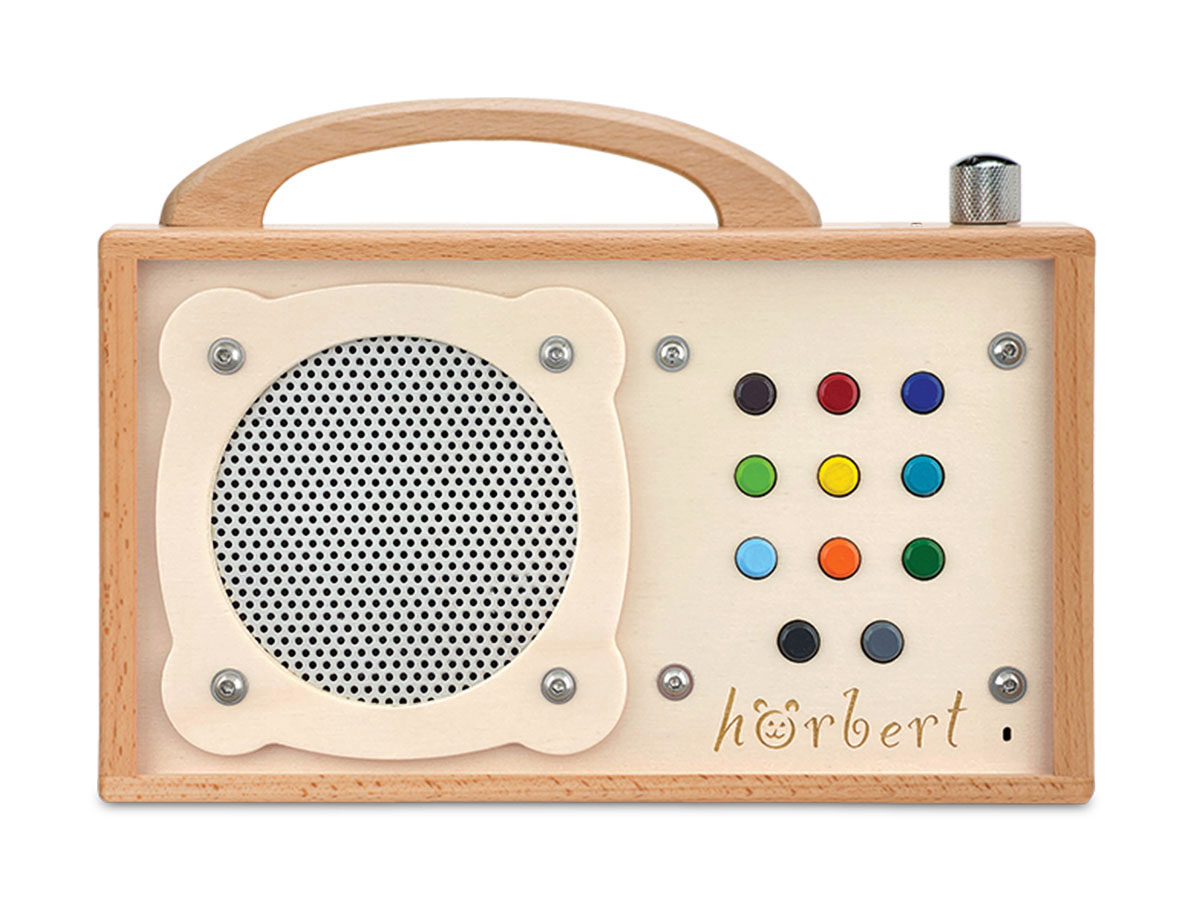
Example: hörbert belongs to this type, and he adds internet radio and podcasts to it.
Here, every audio play is an object – for example a figure that you place on the box, a card that you insert or a coin that you clip on. For very small children, this is the most intuitive way of operating anything there is: thing on top, music on. The figures are toys and collectables at the same time, and anyone who has ever seen the inside of a children's room with the floor covered in toys understands why this principle is so successful.
What hardly anyone knows: technically, the figure is just a key. The music or the audio play sits on a server on the internet and is loaded into the box via Wi-Fi the first time you place the figure on it. Two things follow from this: every audio play costs the price of the figure, which is considerably more than the price of the same audio play as a download, and the system is closed – you can only listen to the content on the manufacturer's boxes. So the audio play only belongs to you for as long as the box keeps running.
The best-known example: the Toniebox.
The box has Wi-Fi, often a screen too, and plays from a catalogue run by the provider. The selection is certainly huge, new episodes play straight away, and for a primary school child who wants to browse independently, that's a real advantage.
The downside lies in the subscription model: without an active subscription the box won't play anything at all, apart from purchased content — but that too sits within a closed system and can't be used without the box. With the screen, you face the question of whether you want to start a three-year-old on screen time. That's why operation is usually additionally enabled via cards or objects used for control.
The Tigerbox is the best-known representative here.
Strictly speaking, this isn't a children's music box at all, but a smart speaker in colourful packaging with a kids' subscription. It's very cheap, because the provider makes its money from the subscription and its other services, and for households that already control their lights and shopping list by voice, using a voice assistant is an obvious step. Voice control through dialogue is particularly appealing, and certainly very exciting for older children.
Two things set it apart from all the other concepts: it needs a permanent power supply and internet connection, so it isn't mobile, and the device is controlled by voice in dialogue — your child has to be able to speak clearly, and the assistant asks questions back. Technically, that's something fundamentally different from a microphone that only records when a child presses a button. Whether you want that in the children's room isn't a question of technology, but of attitude.
In the shop listing for the Echo Dot for Kids you'll find the note: Warning: Use only under direct adult supervision. That's why this product very nearly didn't make it into our comparison. But assistants are on everyone's lips right now.
| Memory card | Figure or card | Streaming | Voice assistant | |
|---|---|---|---|---|
| Best-known example | hörbert | Toniebox | Tigerbox | Echo Dot Kids |
| Biggest advantage | No follow-up costs | Great for collectors | Huge range of content | Interactive |
| Biggest disadvantage | Loading content takes more effort | Expensive little figures | Without a subscription the content is gone | Requires parental supervision |
| Content comes from |
from anywhere: CDs, downloads, media libraries, MP3 files, internet radio, podcasts. Buying content is possible, but not necessary. Open system: content can be backed up and copied |
from the manufacturer, as a figure. The content of a new figure is downloaded via the internet. Closed system: apart from listening to it, you have no access to the content |
streamed directly via the internet from the manufacturer’s catalogue. Often with a separate download option for offline listening. Closed system: apart from listening to it, you have no access to the content |
via the internet from one or more subscriptions and services of the provider. No offline mode. Closed system: apart from listening to it, you have no access to the content |
| Plays internet radio / podcasts | yes / yes | no / no | no / yes | yes / yes |
| Costs after purchase | none, if you only use free content. | one figure per audio play. Even ’empty’ figures for your own content have to be bought from the manufacturer. | Monthly subscription. Even blank cards have to be bought from the manufacturer in order to load your own content. | Monthly subscription, possibly even several subscriptions in parallel for other services |
| Needs the internet | no, only optionally for radio playback and podcast updates (not for podcast playback) | yes, for setup and/or for downloading the content of new figures | yes, permanently for streaming content, or for downloading content | yes, permanently |
| Needs an app | no | yes, for setup and for loading content | yes, at the latest for loading content | yes |
| Works without the manufacturer | yes, without restrictions | only content already downloaded | only purchased content | no |
| Screen | no | no | yes | no |
| Own recordings | directly in the device: microphone, Bluetooth audio, internet radio, without any detour via the manufacturer’s server, until the memory card is full. | via app through the manufacturer’s server, onto e.g. a “Creative” figure, which has to be bought and unlocks 90 minutes of space. | via app through the manufacturer’s server, onto e.g. a “Wildcard”, which unlocks 120 minutes of space. | no |
| Expandable storage | yes, with larger or several memory cards | no | no | no |
| Built-in microphone | only at the press of a button | no | no | permanently listening, can be switched off, but then the device can no longer be controlled |
| Mobile / battery | yes | yes | yes | no |
| Battery life up to | 35 hours | 8-10 hours | 8-11 hours (screen off) | no battery |
| Bluetooth functions | As a speaker for your phone on the one hand, or playback on up to two headphones on the other | Playback on one Bluetooth headphone possible | Some models: playback on one Bluetooth headphone possible | As a speaker for your phone on the one hand, or playback on one headphone on the other |
| Wired headphones | no, because of the risk of strangulation | yes | yes | no |
| Repairable / spare parts available / manufacturer service | yes / yes / repair + upgrades | no / no / replacement | no / no / replacement | no / no / replacement |
As of: September 2026


Many people who land on this page weren’t searching for a “music box for children”, but for a “Toniebox alternative” or a “Tigerbox alternative”. Almost always, one of three worries lies behind it: the figure collection ends up costing many times more than the box itself, or the favourite figure has vanished under the sofa, and with it the audio play.
Or, in the other case, the licensing model is too complicated: what plays where and for how long, how do I limit what my child is allowed to do, and why do I have to buy figures or cards for my own content when the storage space is free anyway?
None of these experiences is a flaw of the Toniebox or the Tigerbox! They’re features of the licensing models: if the manufacturers make their living selling licences, they lose money on free content or on your own content.
So anyone looking for an alternative is rarely looking for another figure box or another subscription, but for an entirely different operating principle. For those who value convenience and for very young children, figures are the right choice. Older children benefit from streaming. And for everyone who wants to keep their audio plays, decide for themselves and listen without the manufacturer interfering — and who’s aiming for the longest possible service life — it’s a player with a memory card.
That’s exactly why we built hörbert: colourful buttons instead of figures, your own audio stories instead of buying figures, no Wi-Fi needed, no subscription, and a wooden housing. A device that grows with your child, gets passed on to the second child, or later plays in Grandma’s kitchen.
What you gain
There’s one way of getting content onto a music box that hardly ever comes up in comparisons: recording it yourself. Once a matter of course, today the exception (but one that children really enjoy!). Your child tells a joke, Grandma reads a bedtime story, the children’s programme on the radio should be playable again tomorrow. How a box handles this says a lot about the principle behind it.
With the Toniebox and Tigerbox, recording goes via your phone: open the app, record, upload, and then download it back onto the device through a Creative Tonie or a Wildcard. The recording is made outside the box, sits on the manufacturer’s servers and comes back from there. That works, but it needs a phone, an app and an account every single time.
And by the way: Did you know that both providers reserve the right to check the content you upload yourself?
With hörbert, the recording is made directly in the box. The built-in microphone records when you press the record button and puts the recording straight onto the memory card – as a track of its own, which your child can play back just like any other audio play. The same goes for recordings of whatever is currently playing from your phone via Bluetooth, and for recordings of internet radio while it’s playing. It’s the principle of the cassette recorder we used to tape programmes with ourselves: press the button, done, and completely legal for your own use (private copy). Nobody but you listens to your recordings, and they stay on the memory card, even if the phone, the app or the server should one day no longer exist.
At a glance

The wooden memory card box, Made in Germany. Nine buttons, your own audio plays, microphone, no subscription, no app. Rechargeable batteries from the supermarket, spare parts in the shop.
from €269 incl. VAT
Or read on – below you’ll find out which design suits which type of family.
Your child lines up figures, swaps them with friends, takes their favourite one to bed. For you, the audio play is a thing, not a file. In that case, a figure box is the right choice – just be honest about factoring in the collection, it grows faster than you'd think.
You've got audio drama CDs on the shelf, you download children's programmes from media libraries, you want to let Grandma record a bedtime story and still be using the box in ten years' time. You want to be in full control, without a subscription, without anyone reading along and analysing your behaviour. Then what you're looking for is a music box that plays from a memory card. That's the type we built hörbert for.
Youdon't want to set anything up, copy anything, or manage anything. Your child should be able to choose, and new episodes should simply be there. If you've been getting by with a phone and a Bluetooth speaker so far, this is the natural next step: the same selection, just without your phone. In that case a streaming box is a good fit, as long as you can live with being tied to a subscription and your child is old enough for a screen.
You've already got lights, alarms and shopping lists running on voice commands, and now the kids' room is meant to join in. Then a voice assistant with a children's subscription is the obvious choice. That said, you need to keep an eye on what the assistant says to your child or plays for them.

Rainer, who developed hörbert:
I built hörbert in 2011 for my son. Back then I asked myself the same question: should audio stories go into the box as objects or as files? I had imagined little wooden cassettes. I dropped the idea because I could already picture them disappearing under the sofa and us having to lug the whole stack along on holiday. Instead, there are now nine colourful buttons, each with a playlist behind it. Children remember in no time which playlist is behind which button – the very same ability that lets them beat us grown-ups at Memory with ease. That way a child has their entire collection under control, without anything getting lost. They can listen to the ‘old’ things again whenever they like, and the new ones are always added to the beginning of the playlists.
Using wood came from the wish not to bring even more plastic into the children’s room. Wood feels better, and it lasts longer: I can sand out a dent, but a broken plastic part usually can’t be repaired. Everything hörbert doesn’t have – display, little figures, voice assistant, app – is missing on purpose. I wanted to build a box that belongs to your child and not to an account, and that still works even when there’s no internet, no server or no suitable app any more. Even after many years, customers tell us that the first hörbert has been passed on to the second child, or that it’s now the kitchen radio, or that it lives at grandma’s.
That wasn’t planned. But it’s exactly what happens when you build a device to last ten years or more instead of three.
Yes, all three other design principles. If you like the simple operation of the figure system, but not the costs and the hunt for lost figures, take a look at music boxes with a memory card and buttons. What a three-year-old can operate and what a box has to withstand in the toddler years can be found at Musikbox für Kleinkinder.
Not with every one. With music boxes that are loaded via the internet, the recording almost always has to be uploaded through the mobile app and via a detour through a server on the internet. In doing so, the manufacturers even take the liberty of checking your content, i.e. listening to it themselves.
hörbert records directly in the box and without any detour via a server – using the built-in microphone, from your mobile phone via Bluetooth or from internet radio – and saves the recording as its own track on the card.
The included memory card comes pre-loaded with around 120 minutes of content and holds approximately 3,000 minutes. You can add new content to the memory card without ever taking it out: hörbert creates its own WiFi network, you connect with your phone, tablet or computer and load content via your browser – no app required. You can search for radio stations or podcasts directly in the browser and assign them to hörbert’s playlists.
Not directly, hörbert doesn’t have a built-in streaming client for Spotify. But you can pair your phone via Bluetooth and use hörbert as a Bluetooth speaker and even record audio, if the service allows it. For children listening on their own, we then recommend playing the recorded content from the memory card.
Yes. The very same operation helps people for whom displays and apps are a barrier – with internet radio, podcasts and audiobooks.
More at hörbert for seniors and hörbert accessible.
PayPal uses Google reCAPTCHA to help secure the payment process. (More Information)
You are currently viewing a placeholder content from Accessibility Widget. To access the actual content, click the button below. Please note that doing so will share data with third-party providers.
More InformationYou are currently viewing a placeholder content from Vimeo. To access the actual content, click the button below. Please note that doing so will share data with third-party providers.
More InformationYou are currently viewing a placeholder content from YouTube. To access the actual content, click the button below. Please note that doing so will share data with third-party providers.
More InformationYou need to load content from reCAPTCHA to submit the form. Please note that doing so will share data with third-party providers.
More InformationYou are currently viewing a placeholder content from Google Maps. To access the actual content, click the button below. Please note that doing so will share data with third-party providers.
More InformationYou are currently viewing a placeholder content from OpenStreetMap. To access the actual content, click the button below. Please note that doing so will share data with third-party providers.
More InformationYou are currently viewing a placeholder content from Mapbox. To access the actual content, click the button below. Please note that doing so will share data with third-party providers.
More InformationYou need to load content from reCAPTCHA to submit the form. Please note that doing so will share data with third-party providers.
More Information