


People who use hörbert, especially young children who often playfully press all the buttons, mustn’t accidentally enter hörbert’s SET mode. That’s why we’ve devised a method that can’t be applied “by accident”.
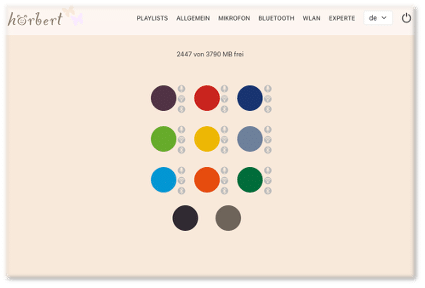
In Browser Set Mode, you can now make all settings for hörbert. For example:
Enable/disable Wi-Fi, Bluetooth and the voice microphone, edit playlists, add podcasts or web radio stations, and much more.
Here you’ll find an overview of the possibilities in Browser Set Mode: BLOG ARTICLE BROWSER SET MODE
PayPal uses Google reCAPTCHA to help secure the payment process. (More Information)
You are currently viewing a placeholder content from Vimeo. To access the actual content, click the button below. Please note that doing so will share data with third-party providers.
More InformationYou are currently viewing a placeholder content from YouTube. To access the actual content, click the button below. Please note that doing so will share data with third-party providers.
More InformationYou need to load content from reCAPTCHA to submit the form. Please note that doing so will share data with third-party providers.
More InformationYou are currently viewing a placeholder content from Google Maps. To access the actual content, click the button below. Please note that doing so will share data with third-party providers.
More InformationYou need to load content from reCAPTCHA to submit the form. Please note that doing so will share data with third-party providers.
More Information