


Categories:
hörbert 2021 FAQ
hörbert 3.0 FAQ
hörbert FAQ
Questions about hörbert
Requirement:
- Your hörbert is already running the new BETA version of the Butterfly2 firmware from October 2025. hörbert 3.0 (release March 2026) definitely has it.
- If needed, here’s how to update to the new BETA version -> Firmware update
People who use hörbert, especially small children who often press all the buttons just for fun, must not end up in hörbert’s SET mode by accident. That’s why we’ve come up with a method that can’t be triggered “by mistake”.
Here’s how to get into hörbert’s SET mode without unscrewing him:
- Press the rotary knob on top and keep it pressed.
- Wait 5 seconds (hörbert may start playing)
- Now additionally press the dark green button.
- Hold both buttons for at least 10 seconds, then first release the rotary knob and afterwards the dark green button.
- hörbert is now in SET mode and opens his own WiFi network for you.
- Connect your smartphone, tablet or computer to hörbert’s WiFi. The WiFi password is: hoerbert
- Then start a web browser on your device and enter the following address: http://hoerbert.local
- Now you’ll see hörbert’s Browser Set Mode on your screen:
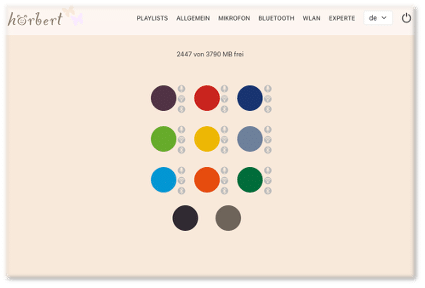
In the Browser Set Mode you can now make all the settings for hörbert. For example:
activate/deactivate WiFi, Bluetooth and the voice microphone, edit playlists, add podcasts or web radio stations, and much more.
Here you’ll find an overview of the options in the Browser Set Mode: BLOG ARTICLE BROWSER SET MODE